
Tienes la version en español Aqui!
Why state machines make UI logic simpler, safer, and way more maintainable.
🤯 The UI Logic Spiral
Let’s be honest: your React component’s state logic probably started simple.
A couple of booleans. Maybe a useEffect. Just enough to get things working.
But then things changed:
You added a loading state.
Then an error state.
Then a retry flow.
Then an edge case where loading and error coexist.
Now you’re juggling isLoading, hasError, isSubmitting, showModal, and a nest of if/else blocks — and you’re still not sure you’ve covered all the cases.
Sound familiar?
🧠 UIs Aren’t Just State — They’re Behavior
We often treat UI state as a flat structure of booleans or enums.
But in reality, your UI is a process. A sequence. A user clicks a button, something happens, and the UI responds.
That’s not just state. That’s state over time — and that’s exactly what state machines are made for.
✅ The Solution: Model Behavior, Not Just State
What if, instead of wiring together a dozen flags, you modeled your UI logic as a state machine?
With a state machine, you:
Define all possible states up front
Describe only valid transitions
Eliminate contradictory or impossible states
Get a visual map of your logic — for free
Let’s look at a simple example.
🧪 Example: Toggle with XState
import { createMachine } from 'xstate';

const toggleMachine = createMachine({
  id: 'toggle',
  initial: 'inactive',
  states: {
    inactive: {
      on: { TOGGLE: 'active' },
    },
    active: {
      on: { TOGGLE: 'inactive' },
    },
  },
});
That’s it.
One machine. Two states. One event. No booleans. No conditionals. No useState.
Simple, expressive, and type-safe.
🔍 Visualizing It
Here’s what that machine actually looks like:
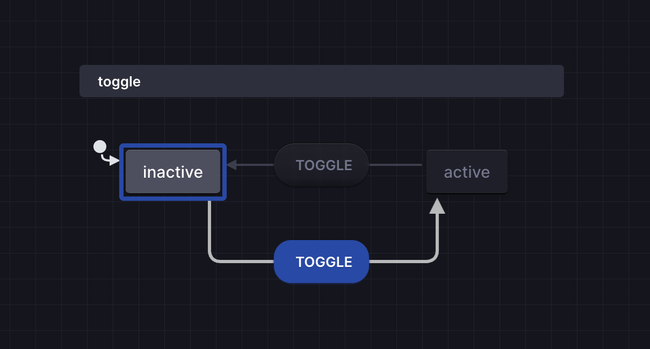
Tools like Stately.ai let you see your machines as flow diagrams — so you and your team instantly understand what’s going on.
🛠️ Why This Matters
This isn’t just for toggles. You can use state machines to:
Simplify multi-step forms and wizards
Model modals, dropdowns, or onboarding flows
Eliminate inconsistent UI states
Replace messy useEffect logic with declarative transitions
And when you pair XState + React + TypeScript, you unlock type-safe, testable UI logic that scales.
⏭️ Coming Up Next: States, Events, and Transitions
In the next issue, we’ll break down the three building blocks of any state machine — and how to spot them in your own components.
You’ll learn how to go from messy state to modeled behavior in minutes.
💡 Try This
Pick a small UI interaction in your app — a toggle, modal, or dropdown — and try modeling it as a state machine.
Just one.
Then ask yourself: was this easier to reason about?
Hit reply and let me know how it went — or tag me on Twitter/X. I’ll feature a few community examples in future issues.
Thanks for reading,
Horacio
Do you like what you are reading? Subscribe to receive updates.
Unsubscribe anytime